Is Prepostseo worth paying for? For most people, no. Prepostseo’s free tools do the job for occasional checks, and the paid plans only make sense if you run plagiarism or DA checks in bulk every week.
That’s the short answer.
I’ve used PrePostSEO myself, and in October 2026 I went back to see what had changed since I first wrote this review: the tools, the free limits and the prices. A few things moved. The free DA checker now takes fewer URLs, the paraphrasing tool has ten modes instead of four, and the WordPress plugin is gone.
You’ll see the brand written as Prepostseo, Pre Post SEO or Prepost SEO. It’s the same site, prepostseo.com. In this Prepostseo review I stick to the tools people actually come looking for: the plagiarism checker, the paraphrasing tool, the grammar checker, the summarizer and the domain authority checker. If you’re doing your own content writing for a blog, those are the ones that matter.
What is Prepostseo?
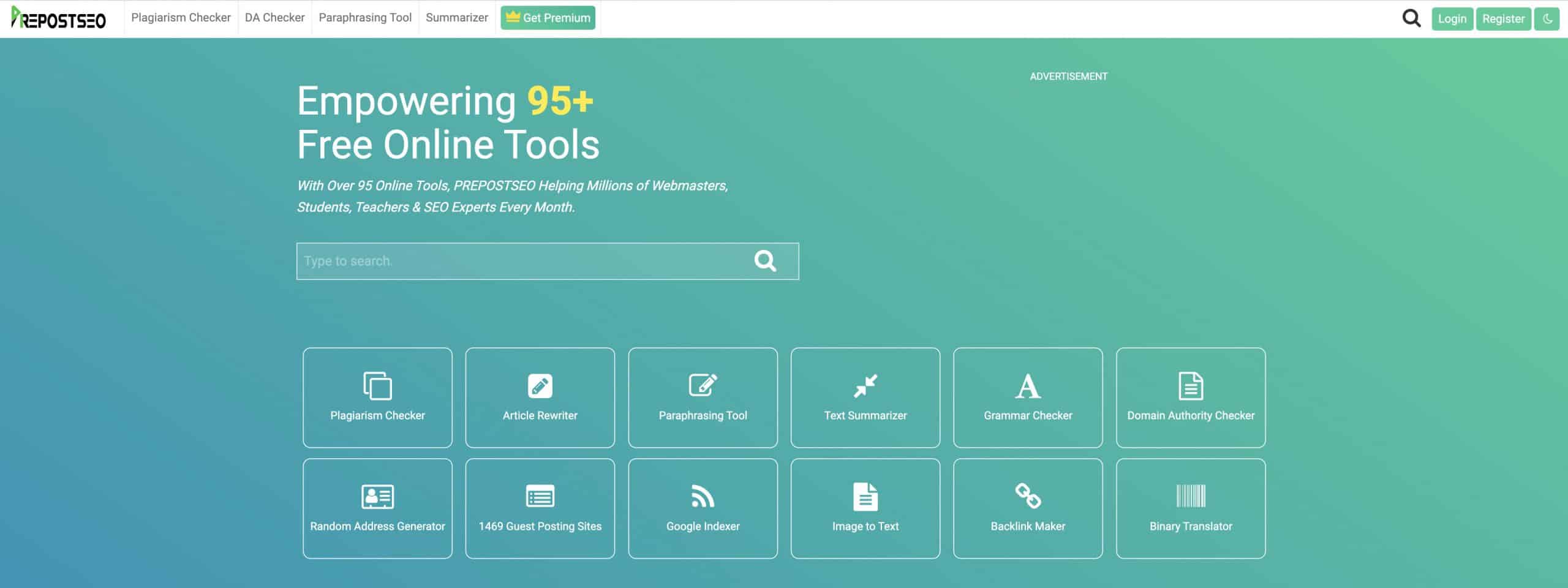
Prepostseo is a free online toolkit for webmasters, students, teachers and content creators. When I first reviewed it, the site listed around 95 tools. Today its homepage says over 150.
Most are small utilities around the famous ones: the plagiarism checker, keyword density checker and article rewriter.
To keep that many tools usable, the site groups them by job. The writing and education tools are where you find the plagiarism checker, article rewriter, grammar checker, paraphrasing tool and text summarizer. The domain tools include the Domain Authority Checker, a domain age checker and a broken links checker. Then there’s a website management group with things like a Google index checker, a DNS report and a server status checker.
And a misc. category with text generators, calculators and other tools you’ll use once.
Prepostseo’s Key Features
On paper, Prepostseo is a toolkit that helps you optimize your site so it ranks higher in search results.
In practice? It depends on the tool. Here are the five I’d actually open, and where each one annoys you.
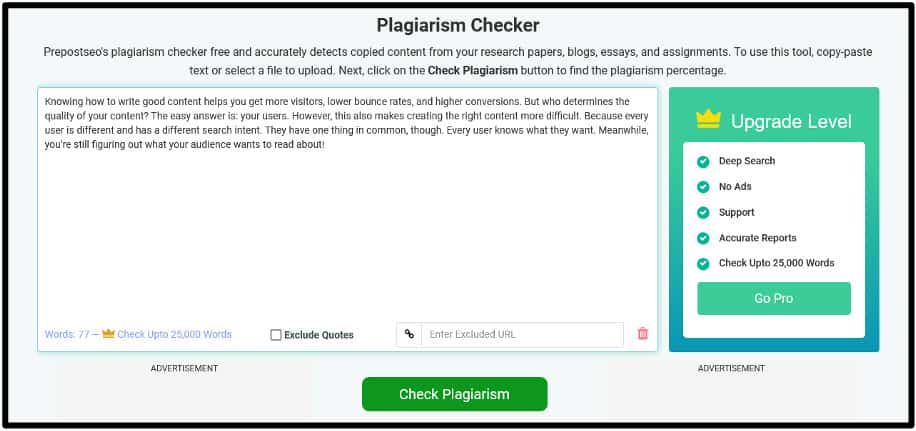
First up is the plagiarism checker. You paste or upload your text and it scans it against the web, Google’s index included, looking for copied passages.
The free box takes 1,000 words per check. Premium plans raise that to between 5,000 and 25,000 words per submission, depending on the plan.
This is what it looks like once you paste your content in:
And this is what the results look like after the scan:
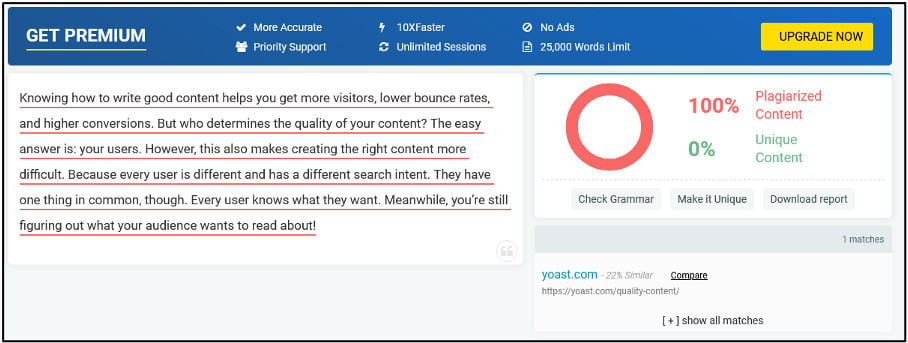
Copied sentences show in red and unique ones in green, with an overall percentage on top. Every flagged sentence links to the page where the text was originally published, so you can either cite it or rewrite it.
You can also compare your text side by side with the source, which helps when you’re deciding how much to rewrite. And you can download the report, useful if a client or editor wants proof the article is original.
Next is the Paraphrasing Tool, which shows up a lot in searches for this brand. When I tested it, it had four content modes and two of them were locked behind the paid version. In October 2026 the page lists ten: Standard, Fluency, Reworder, Smooth, Formal, Creative, Natural, Academic, Simplifier and Improver. The free box takes 1,000 words, and the premium paraphraser costs $7 a month or $63 a year, with 2,500 words per submission and every mode available.
These screenshots are from my original free test. First, Standard mode:
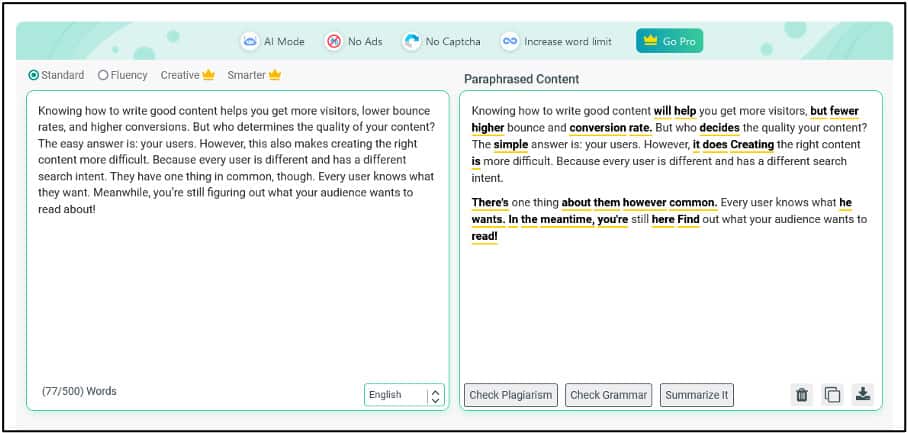
Standard mode doesn’t touch the tone. It swaps some words for synonyms, and a few of those synonyms don’t really fit the context. So if you use it, read every sentence before you publish.
Then Fluency mode:
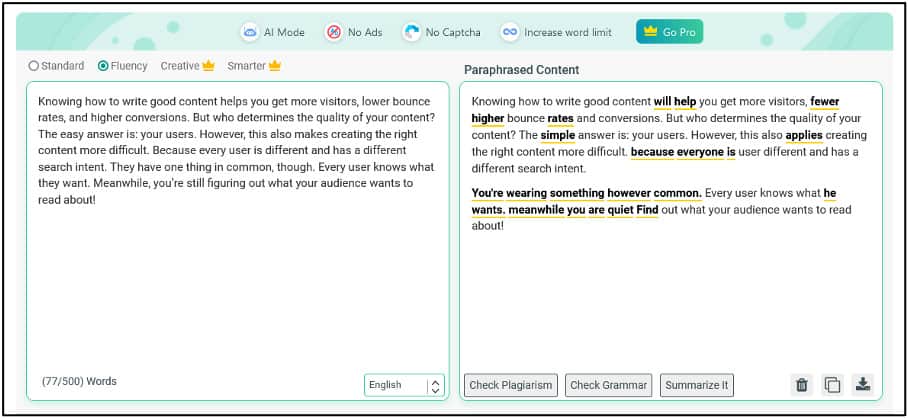
Fluency tries to make the text read more smoothly. Mostly it does that by changing the voice of the sentence, from passive to active and the other way round.
Both free modes hold up for short pieces. What bugs me is the rest: the ads, the captcha, and not being able to try every mode before paying. I wouldn’t publish anything straight out of it without editing.
Next up is Prepostseo’s Grammar Checker. It’s simple. The page calls it free and unlimited, and I didn’t hit a word limit with normal blog posts. It catches spelling and punctuation too.
Here’s how it works:
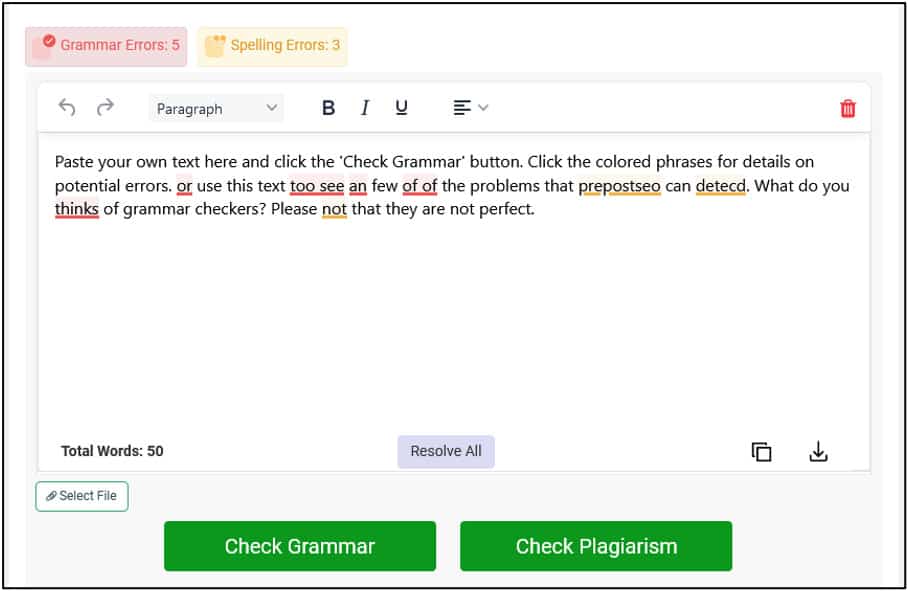
Grammar errors are underlined in red and spelling issues in yellow. Click on one and it tells you whether it’s a spelling mistake, missing punctuation or the wrong word. Or you can fix everything at once with a single button (it said Resolve All in my screenshot; it’s now called Fix All).
Handy, but it accepts suggestions you haven’t read. When I first tested it you couldn’t choose a language at all. Now there’s a language menu with about a dozen options and auto-detection, but English is still one option, with no US or UK split. If you write for a British audience, keep an eye on the spelling.
Prepostseo’s Text Summarizer is free too. You can upload a file instead of pasting, download the output and choose the summary length. The free version takes up to 1,500 words at a time, with no daily limit, and premium raises it to 2,500 words per submission.
Here’s the test I ran with some sample text:
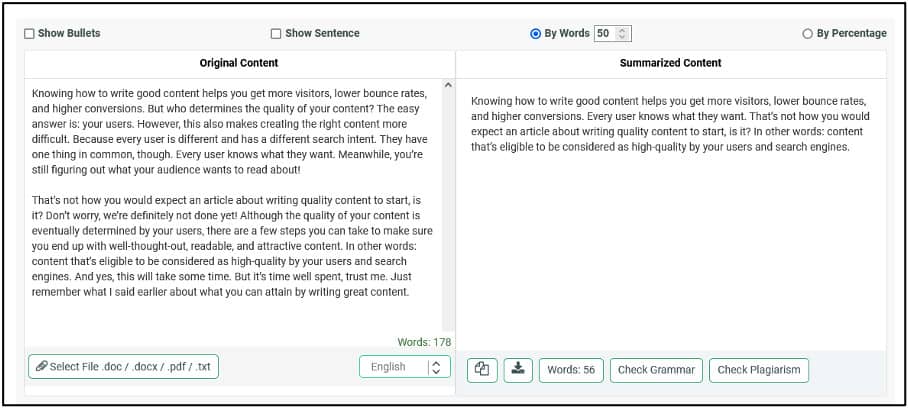
The 178-word sample came out as 56 words. You can get the summary as a paragraph, as bullet points or as a single best line.
It worked fine on short texts. On longer pieces, over about 1,000 words, expect it to skip some points you care about and add those back by hand. Still, it saves time.
The DA PA Checker is the other tool people look up by name, usually as prepostseo DA checker. You paste a list of URLs and it returns domain authority, page authority, spam score and domain age for each one. The data comes from Moz’s API, according to the tool page.
The free version used to take 10 URLs at a time. Now it’s 5. Premium users can paste up to 500 at once, and there’s a standalone DA PA plan for $10 a month (7,000 URLs) or $60 a year (100,000 URLs). Here’s how the results look:

So, what are you looking at? DA is Domain Authority, PA is Page Authority and SS is Spam Score. All three are Moz metrics, not Google ones. Google has said many times that it doesn’t use domain authority to rank pages.
That doesn’t make DA useless. When you’re sizing up a new niche, a quick bulk check tells you whether page one is full of big brands or small blogs you could compete with. For that job, this domain authority checker is quick and free, and that’s all you need from it.
Prepostseo’s Plagiarism Checker API
Now for something that isn’t a writing tool. Prepostseo also sells a Plagiarism checking API (Application Programming Interface), so you can plug its checker into your own website or app.
When I checked the API page in October 2026, the prices were the same as when I first wrote this. Each plan lasts 30 days:
- Basic: $10 for 5,000 queries
- Premium: $29 for 25,000 queries
- Company: $199 for 250,000 queries
- Custom: price on request
A query is roughly one sentence. Prepostseo’s own FAQ says a 300-word article uses 12 to 18 queries, so the Basic plan covers a few hundred articles a month.
The API runs on the same checker I tested above, so if that works for you, the API should too. One warning: their refund policy says API plans are non-refundable.
Prepostseo WordPress Plugin
This section needs an update. When I first wrote this review, the Prepostseo WordPress Plugin let you check posts for duplicate content, SEO score and grammar errors without leaving the editor.
It’s not available anymore. The Prepostseo WordPress Plugin page on WordPress.org says it was closed on May 30, 2023 for a security issue, and you can’t download it.
If it’s still installed on an old site of yours, remove it. A closed plugin gets no security fixes, so paste your drafts into the website tools instead.
Prepostseo Pros and Cons
Here’s what I like about Prepostseo and what I don’t, updated with what I found in October 2026.
- Lots of tools work for free
- No registration needed for most free tools
- Cheap paid plans if you need volume
- Simple, clean interface
- Live chat on the site
- The DA checker handles up to 500 URLs on premium
- Text summarizer with no daily limit
- Will refund accidental double charges
- Lots of ads in the free version
- Captchas on free checks
- Some tools aren’t very useful until you pay, like the locked paraphrasing modes
- Only 1,000 words per free plagiarism check
- The free DA checker dropped from 10 to 5 URLs
- Strict refund policy: no refunds for change of mind, partial use or renewals
- The WordPress plugin was closed in 2023
Pricing and Premium Packages
Before I wrap up this Prepost review, let’s talk about money. The free tools work the same as the paid ones. What you pay for is volume, speed, and no ads.
Here are the All in One plans. I checked the pricing page in October 2026 and the prices hadn’t changed since my first version of this review:
| Basic | Standard | Company | |
| Monthly | $10 | $20 | $45 |
| Annually | $50 | $150 | $350 |
And here’s how many plagiarism search queries each plan gives you:
| Basic | Standard | Company | |
| Monthly | 5,000 searches | 25,000 searches | 75,000 searches |
| Annually | 50,000 searches | 200,000 searches | 500,000 searches |
Words per submission also go up with the plan: 5,000 on Basic, 15,000 on Standard and 25,000 on Company. Every plan includes the plagiarism checker, paraphrasing tool, image to text converter, DA PA checker and AI essay writer, plus deep search, no ads or captchas and 24/7 support.
If you only need one tool, there are cheaper single plans. The paraphraser is $7 a month, and the DA PA checker is $10 a month or $60 a year.
Is it worth it? For the price, Prepostseo is still one of the cheapest content toolkits I know. Just remember that paying buys volume. The checks themselves are the same.
You might want to read next:
Prepostseo review- final thoughts
So, should you use Prepostseo? Yes, for free. For the most part, it is free, and you can try each tool before you spend anything.
Pay for Prepostseo only if you check plagiarism or domain authority in bulk every week. If you publish a couple of posts a month, the free limits are enough, and the ads are the price you pay.
And who shouldn’t bother? Anyone looking for a paraphraser that writes publishable text on its own, or a WordPress plugin. My suggestion: open the plagiarism checker and the DA checker, run your next article and your niche’s top 5 competitors through them, and decide from there.
FAQs
RELATED CONTENT